HDFC Credit Card Limit Increase by Email: What Actually Works in 2026
Most guides tell you to use NetBanking or call customer care. But what if the app says you're not eligible? I got my HDFC limit raised from ₹31,000 to ₹1 lakh by emailing the grievance team. Here's the full process with real screenshots.

Most articles about increasing your HDFC credit card limit will tell you the same things. Log in to NetBanking, go to the Cards section, submit a request. Or call customer care. Or wait for an automatic offer.
What they do not tell you is what to do when the app flat out says you are not eligible.
That happened to me. My HDFC Biz Grow Visa had a limit of ₹31,000. I had been using the card for about a year, never missed a payment, paid in full every month. Still, the in-app enhancement tool said no.
So I sent a direct email to HDFC's grievance team, attached my ITR, and waited. 14 days later my limit was ₹1,00,000.
This post covers all the ways to increase your HDFC credit card limit, and goes deep on the email route because that is the one most people do not know about.
All the Ways You Can Request a Limit Increase
HDFC gives you a few options depending on your situation.
NetBanking or the HDFC app is the easiest route if you are eligible. Log in, go to Cards, look for Credit Limit Enhancement under the Request section, and submit. If the system shows you as eligible, this usually gets processed within a few days without any documents.
Calling customer care works too. You can reach HDFC credit card support 24x7 and request an enhancement verbally. They may ask you to submit income proof documents separately.
Auto offers from HDFC happen periodically. The bank reviews active accounts every 6 to 12 months and sometimes sends an enhancement offer directly to your email or SMS. You just need to accept it.
Emailing the grievance team is what this post focuses on. It is the manual route that works when every other option fails or gives you a small increase that does not meet your actual need.
Why the Email Route is Different
When you use the app or NetBanking, it runs an automated eligibility check. The system scores your account against a set of internal parameters and returns a yes or no. If you land in the no bucket for any reason, there is no appeal, no explanation.
The grievance email goes to a different team entirely. A person actually opens your request, looks at your account history, reads your income documents, and makes a judgment. This is why it can succeed even when the app does not.
It takes longer. But for anyone who has been rejected through automated channels or wants a significantly higher limit than what the app offers, this is the right path.
Before You Send the Email
A few things worth checking first. If any of these apply to you right now, hold off on the request.
Your repayment history needs to be clean. Even one missed payment in the past few months can get your request rejected. HDFC looks at this closely during manual review.
The card should be at least 6 months old, ideally close to a year. Banks want to see how you actually use credit before extending more of it.
Your CIBIL score matters because HDFC will run a hard enquiry as part of the process. A score above 700 is comfortable. Below 680 and the request is less likely to go through.
Where your CIBIL score stands today affects how much HDFC will offer you
If your payments are on time, the card has some history, and your score is in decent shape, you are ready to send the email.
What Documents to Attach
The right documents depend on how you earn.
If you are salaried, attach your last 3 months salary slips. If you want to strengthen the case, add your Form 16 as well. Some people also include recent bank statements showing salary credits.
If you are self-employed or a freelancer, attach your latest ITR acknowledgement. This is the PDF you download from the income tax portal after filing, also called the ITR-V. It shows your declared income for the year and is the primary document HDFC uses to assess your eligible limit.
In both cases, keep the attachment under 5MB. Grievance inboxes sometimes silently drop large files, and you would have no way of knowing.
The Email to Send
Send this from your registered email ID only, the one linked to your HDFC account. Emails from any other address often do not get processed.
Dear HDFC Bank Credit Cards Team,
I hope this message finds you well.
I am writing to request an enhancement of the credit limit on my HDFC credit card ending [Last 4 Digits of your card].
I have been a cardholder for [X months] and have maintained a clean repayment record throughout. All payments have been made on time and in full since issuance.
My financial requirements have grown over time. I use this card regularly for [briefly mention your use case, for example: work-related expenses, travel, monthly subscriptions, household purchases]. The current limit has become insufficient for my needs, and I often find myself routing transactions through other payment methods that I would prefer to handle through this card.
I would like to request a credit limit enhancement to ₹[your target amount]. I had previously tried the in-app limit enhancement option but it was not successful.
I have attached my [salary slips for the last 3 months / latest ITR acknowledgement] for your review. Please let me know if any additional documents are required.
Thank you for your time and assistance.
Warm regards, [Your Full Name] [Registered Mobile Number] [Registered Email ID]
✦ Replace text in [brackets] with your actual details. Send only from your registered email ID.
A few things worth noting about this email. Mentioning that you already tried the app shows you are not trying to bypass the normal process. Specifying a target amount gives the reviewer an anchor to work with rather than deciding arbitrarily. And attaching the documents upfront removes the back and forth that slows things down.
On the target amount, aim for 2 to 3 times your monthly income. That is the range where your income documents can realistically back up the request. Asking for much more than that tends to result in a reduced offer or a straightforward rejection.
Where to Send It
To: grievance.redressalcc@hdfc.bank.in
This is the only address you need. Make sure you are using the @hdfc.bank.in domain. The older @hdfcbank.com addresses like priorityredressal.creditcards@hdfcbank.com are either migrated or inactive, so stick to the .bank.in handle.
The Full Timeline with Screenshots
Here is exactly how the process played out when I did this in April 2026.
Day 1 — Sending the Email
I sent the request on a Saturday morning with my ITR attached. The card at this point was about 11 months old. All payments had been made in full every month.
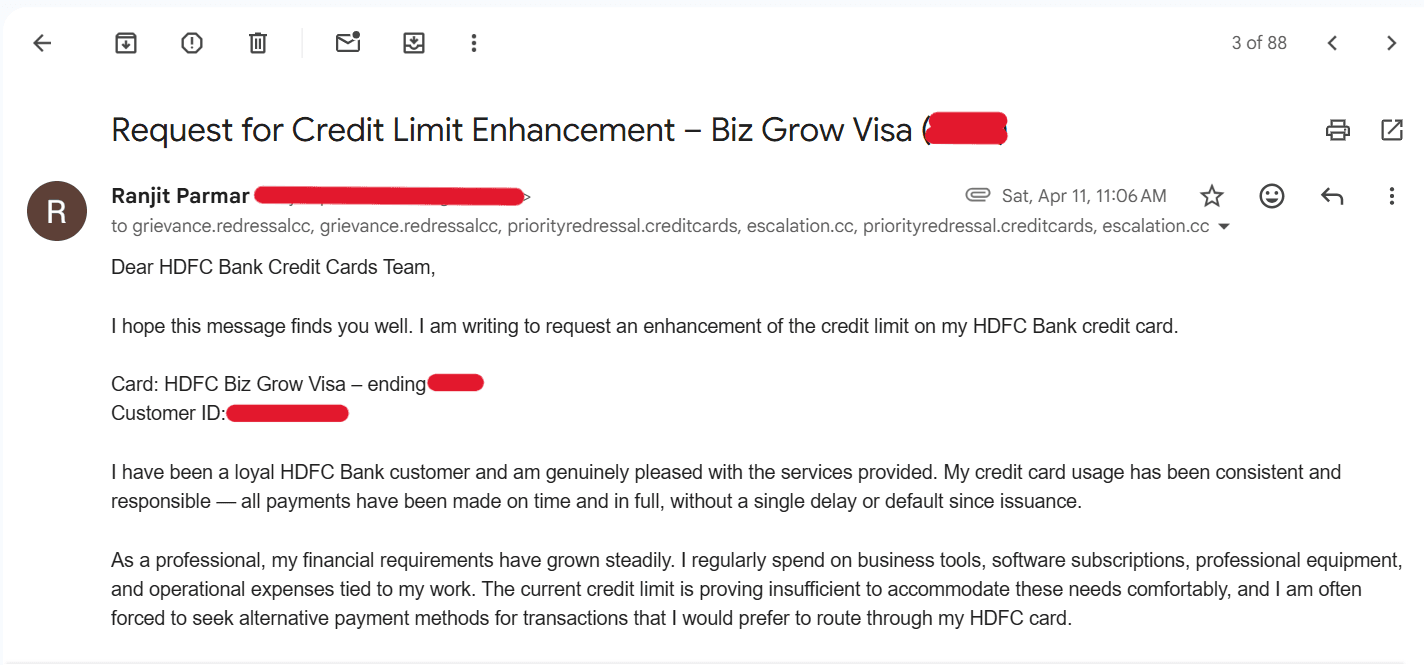 Email sent to HDFC grievance team on April 11, 2026 requesting credit limit enhancement for HDFC Credit Card
Day 3 — Interim Acknowledgement
Two days later I received an automated interim reply. HDFC acknowledged the request, assigned it a reference number, and committed to a resolution by a specific date (10 working days from my email).
Save this reply. The reference number in it is what you will use when responding later in the process.
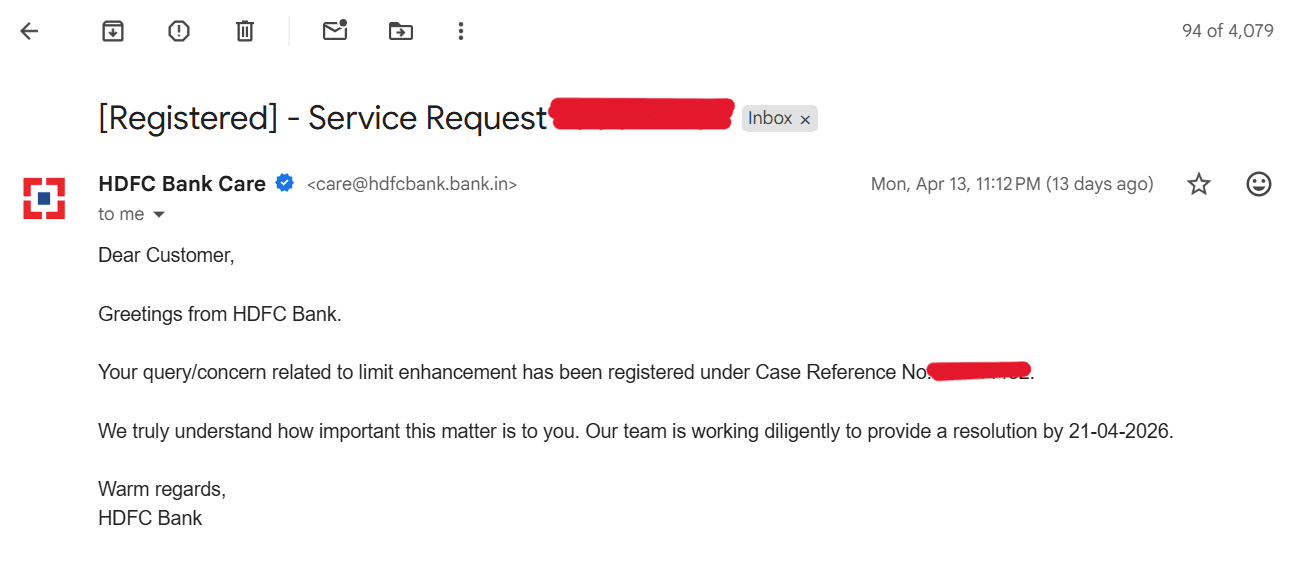 HDFC Bank interim acknowledgement email with reference number and resolution date
Day 11 — The Offer Arrives
Right on the committed date, the offer came through. HDFC had reviewed my ITR and came back with an additional limit of ₹69,000 on top of my existing ₹31,000.
There is one thing about this email worth knowing beforehand. HDFC does not mention your total new limit in this message. They only tell you the additional amount, citing security reasons. To find your new total, just add the offered amount to your current limit.
The email also asks for three specific things before they proceed: your agreement to the offered increase, the last 4 digits of your card for verification, and your consent for a CIBIL check. The CIBIL check is a hard enquiry and will appear on your credit report. If your score is healthy it should not cause any significant impact.
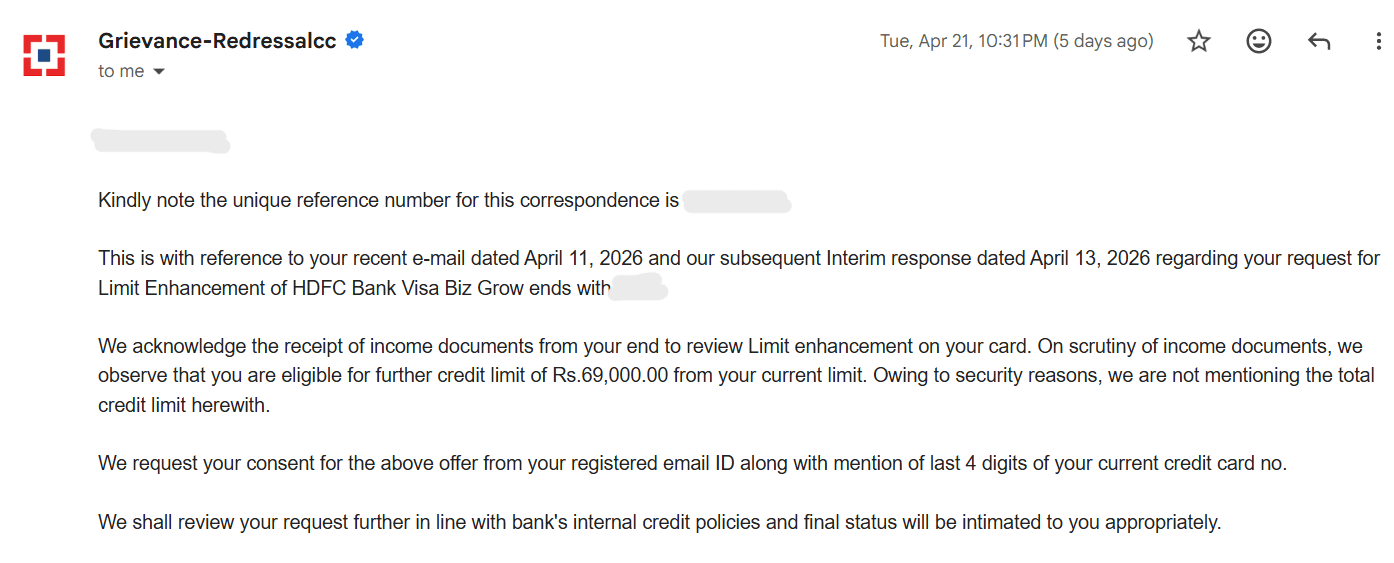 HDFC Bank offer email showing ₹69,000 additional credit limit approved based on income document review
Day 12 — Sending Consent
I replied the next morning from the same email thread so the reference number carried forward. The reply is straightforward.
Dear [Representative Name],
Thank you for reviewing my request and sharing the details.
Please find my consent below:
- I agree to the offered additional credit limit of ₹[Offered Amount].
- Last 4 digits of my card: [XXXX]
- I provide my consent for CIBIL scrutinization for this limit enhancement.
Please proceed at your earliest convenience. Let me know if anything else is needed from my end.
Warm regards, [Your Full Name] Ref No: [Reference Number]
✦ Replace text in [brackets] with your actual details. Send only from your registered email ID.
Day 14 — Limit Updated
Three days after sending consent, the confirmation email arrived and the new limit showed up in the HDFC app and NetBanking.
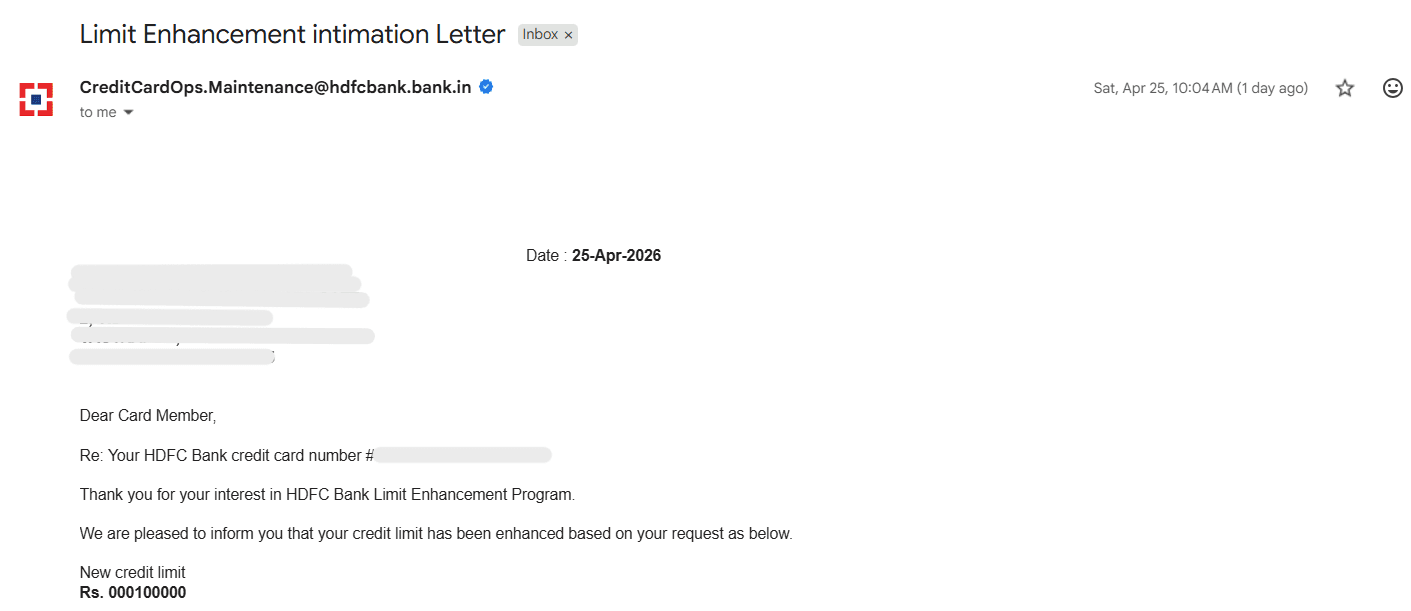 HDFC Bank credit limit enhancement confirmation email — new total limit ₹1,00,000
The entire process from the first email to the updated limit took 14 days.
Mistakes That Get Requests Rejected
A few things that tend to kill these requests before they even get reviewed properly.
Sending from an email ID that is not registered with HDFC is the most common one. The grievance team cannot verify your identity if the email is coming from an address they have no record of.
Not attaching income documents in the first email. If you say you will send them when asked, that usually means one more round of back and forth and a slower process overall. Attach everything upfront.
Requesting a limit that is not supported by your income. If your ITR shows ₹4 lakh annual income and you are asking for a ₹5 lakh credit limit, the numbers do not add up and the request will come back reduced or declined.
Having a recent missed or delayed payment on your account. Manual reviewers check this. Even one late payment in the last 6 months can result in an outright rejection.
Using inactive email addresses. As mentioned above, only grievance.redressalcc@hdfc.bank.in is confirmed active. Do not use the @hdfcbank.com variants.
If HDFC Does Not Respond by the Committed Date
Reply to your original thread and politely reference the committed resolution date and your reference number. Most of the time this is enough to get things moving.
If there is still no response after a few more days, file a complaint on the RBI Ombudsman portal at cms.rbi.org.in. Banks respond very quickly to ombudsman complaints, so this is an effective escalation if needed.
Does This Work for All HDFC Credit Cards?
Yes. The email process is the same for every HDFC card variant whether it is Regalia, MoneyBack, Millennia, Freedom, Biz Grow, or any other. The grievance address is the same, the documents required are the same, and the timeline is roughly the same. The only thing that changes is the additional limit HDFC offers, which depends on your income and account history rather than the card you hold.
Just starting out with credit cards in India? Here are the best options to begin building your history
A stronger credit profile makes it easier to get larger limit increases approved
If the HDFC app says you are not eligible for a limit enhancement, that is not the final answer. It just means the automated check said no. The manual route exists, and as the screenshots above show, it works. One email, income proof attached, the right address. Give it a couple of weeks.
Frequently Asked Questions
Can I increase my HDFC credit card limit by sending an email?
What is the correct email address for HDFC credit limit enhancement?
What documents should I attach for HDFC credit limit increase?
How long does HDFC take to process a credit limit increase request sent by email?
HDFC app shows not eligible for limit enhancement. What should I do?
How much credit limit increase should I request?
Will HDFC run a CIBIL check for limit enhancement?
Ranjit Parmar
ranjitparmar.in ↗Writing about personal finance the way a smart friend would explain it — no jargon, no filler. I started KnowMoney because most finance advice in India is either written for MBAs or it's a sales pitch.